Posts

Send Email With SharePoint Lookup Columns Data Using Power Automate

Image
  Introduction   In this article, we are going to send an email with SharePoint Lookup Column data using Power Automate. We will create a flow that’s run weekly that fetches data from a SharePoint list which contains lookup columns. We will use the “Apply each” action to get lookup records.   SharePoint Parent List - "ProductSales"   Columns Type Title Text ExpiryDate DateTime SalePersonName LookUp (SalePerson List)   SharePoinChild List - "SalePerson"   Columns Type Title Text   In the above lists we have SalePersonName column which is actually the Title column from SalePerson List. When we “Parse Json” data in the above type of data we get two title fields in the dynamic column section. And sometimes workflow fails due to a null record in lookup column. Let’s see the data in the list as below,     Log in to Office.com with Office 365 credentials. Go to the “Power Automate” tile and click on it. It will be redirected to the Power Automate Pa...
Send an Email Reminder Notification Based on an Expiration Date using Power Automate

Image
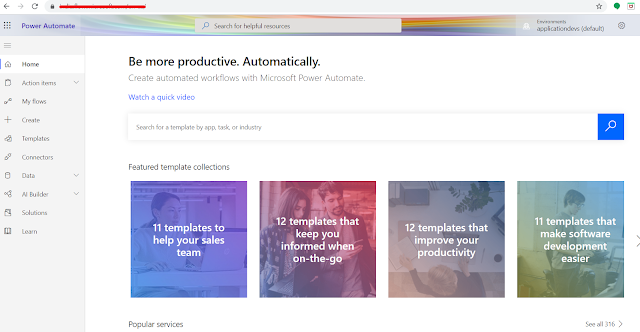
Introduction    In this article, we are going to create an email reminder notification based on an expiration date using Power Automate. We will create a flow that’s run daily that reads & filters data from a SharePoint list that has list items that expire in the next 5 days. Then it will send an expiration notification email to a particular user.   SharePoint List - "ProductSales"     Columns  Type  Title  Text  ExpiryDate  DateTime   Let’s log in to Office.com with office 365 credentials. Go to the “Power Automate” tile and click on it.   It will be redirected to Power Automate Page. Click on Create button from left navigation.   Click on the scheduled flow tile. It will open the popup.       Create Recurrence Flow Enter the flow name and select a specific time when we want to schedule this workflow. Then, click on the create button. It will ...

The Developer’s Journey: Navigating Doubt, Frustration, and Growth

Many software developers aspire to work for leading tech companies and become experts in their field. This journey, however, takes time and perseverance—excellence doesn’t happen overnight. Along the way, it’s common to face self-doubt, frustration, and a flood of uncertain thoughts. Here’s a look at some common mental hurdles developers encounter, along with practical ways to move past them:

Contact application - Upgrade Asp.net Core 2.0 to 2.1

Image
In this article, we will look into steps for contact application - upgrade Asp.net Core 2.0 to 2.1, please see my previous articles about how we developed contact application: ContactApplication using ASP.NET Core Web API, Angular 6.0, and Visual Studio CodePart One: In the article, we will set up ASP.NET Core Web API project, and develop the Web API for contact CRUD operations. ContactApplication using ASP.NET Core Web API, Angular 6.0, and Visual Studio CodePart Two: In the article, we will setup Angular 6 within ASP.NET Core Web API Project, and develop the contact form & list component using Angular Material UI that will consume Web API which we have created in Part One. ContactApplication Azure Deployment: In this article, we are going to deploy/host a contact application with Visual Studio code to Azure web apps. Please note:   Previously we have used Asp.net Core 2.0.3 for contact application, now upgrade to Asp.net Core 2.1.5. This is download link for ...

MySQL - Good Habits

In this article, we are going to learn few good habits that we can consider important aspect while work with MySQL to improve performance & troubleshoot as following below: #1 - Do not use stored procedure & function parameters name same as WHERE clause field name It will be responding with all record of query because MySQL interprets field value as parameter value similar like 1=1. Example: -- Bad    CREATE   PROCEDURE  `getPersonById`( IN  id  INT (10))   BEGIN    -- return all record instead    SELECT  id, name   FROM  person  WHERE  id = id;   END    -- Good    CREATE   PROCEDURE  getPersonById( IN  personId  INT (10))   BEGIN    SELECT  id, name   FROM  person  WHERE  id = personId;   END      #2 - Use same data-type...